Author's posts
Aug 27 2020
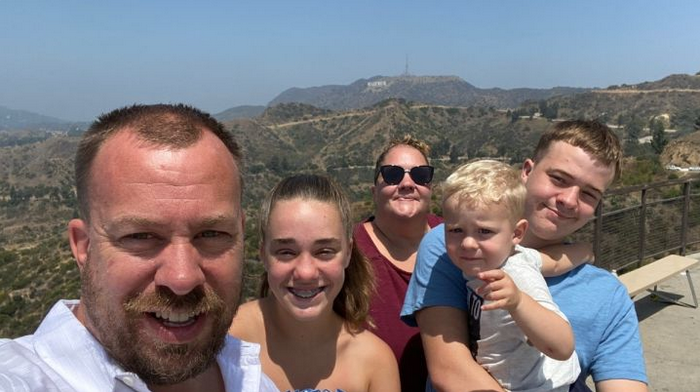
Help a vBrother and his family out if you can…
Despite having grown into a very large community I’ve always felt the VMware community has always been a tight and close group of people with a lot of great friendships spanning the globe. I personally have always felt a special bond to those in that community, one that extends beyond the intense competitive nature of companies within that community. At one point in my life I somewhat reluctantly asked the community for help and there was an incredible response which I felt very humble and gratified by. People that I barely knew, sometimes only meeting once a year in passing or interacting with online stepped up to help out which I was eternally thankful for.
Another vBrother is in need right now who lost everything in the California wildfires which is a tragic situation, I can’t even imagine having to start over like that in that very tough situation. Alan Renouf, who is one of the scripting and automation gods in the community is in need of our help so if you can there is a GoFundMe page that you can donate to to help him and his family get back on their feet. I know times are tough right now so even if you can’t donate say a little prayer for his family to help get them on the path back to a normal life again.
Mar 10 2020
vSphere 7.0 Link-O-Rama
 Your complete guide to all the essential vSphere 7.0 links from all over the VMware universe.
Bookmark this page and keep checking back as it will continue to grow as new links are added everyday.
Also be sure and check out the Planet vSphere-land feed for all the latest blog posts from the Top 100 vBloggers.
VMware announces vSphere 7.0: Here’s what you need to know (vSphere-land)
Introducing vSphere 7: Essential Services for the Modern Hybrid Cloud (VMware vSphere Blog)
VMware online launch event replay (VMware.com)
VMware vSphere 7 Datasheet (VMware.com)
VMware What’s New Links
What’s New in vSphere 7 Core Storage (VMware Virtual Blocks)
What’s New in SRM and vSphere Replication 8.3 (VMware Virtual Blocks)
Announcing vSAN 7 (VMware Virtual Blocks)
What’s New in vRealize Operations 8.1 (VMware Cloud Management)
Announcing vRealize Suite Lifecycle Manager 8.1 (VMware Cloud Management)
Announcing VMware vRealize Automation 8.1 (VMware Cloud Management)
Announcing VMware vRealize Orchestrator 8.1 (VMware Cloud Management)
What’s New in VMware Cloud Foundation 4 (Cloud Foundation)
Delivering Kubernetes at Cloud Scale with VMware Cloud Foundation 4 (Cloud Foundation)
Introducing vSphere 7: Features & Technology for the Hybrid Cloud (VMware vSphere blog)
VMware Video Links
Overview of vSphere 7 (VMware vSphere YouTube)
What’s New in vCenter Server 7? (VMware vSphere YouTube)
vSphere 7 with Kubernetes (VMware vSphere YouTube)
What’s New with DRS in vSphere 7 (VMware vSphere YouTube)
Assignable Hardware in vSphere 7 (VMware vSphere YouTube)
vSGX & Secure Enclaves in vSphere 7 (VMware vSphere YouTube)
Identity Federation in vSphere 7 (VMware vSphere YouTube)
vSphere Trust Authority in vSphere 7 (VMware vSphere YouTube)
Timekeeping (NTP & PTP) in vSphere 7 (VMware vSphere YouTube)
vCenter Server 7: Update Planner (VMware vSphere YouTube)
vCenter Server 7: Multihoming (VMware vSphere YouTube)
vMotion Improvements in vSphere 7 (VMware vSphere YouTube)
DRS with Scalable Shares in vSphere 7 (VMware vSphere YouTube)
vSphere Academy
Introduction to vSphere 7 (VMware.com)
vSphere 7 Overview (VMware.com)
vSphere 7 Demo (VMware.com)
vSphere 7 with Kubernetes Overview (VMware.com)
vSphere 7 with Kubernetes Demo (VMware.com)
Availability (HA/DRS/FT) Links
VMware vSphere 7.0 DRS Improvements – What’s New? (ESX Virtualization)
Introducing Scalable Shares – vSphere 7 (Yellow Bricks)
vSphere 7 and DRS Scalable Shares, how are they calculated? (Yellow Bricks)
Documentation Links
Download Links
ESXi Links
General Links
What’s New in vSphere 7 with Kubernetes, VCF 4 and vSAN 7? The Important Bits (Ather Beg)
What’s New in vSphere 7? The Important Bits (Ather Beg)
What’s new in VMware vSphere 7 (Ivo Beerens)
VMware new product announcements: vSphere with Kubernetes (Project Pacific) & Tanzu App Portfolio (JohannStander)
VMware’s announcement about App modernization in a multi-cloud world (Kristof’s virtual life)
What’s New in vSphere 7.0 Overview (Plain Virtualization)
VMware vSphere 7 Announced (TinkerTry)
vSphere 7.0 completely transforms VMware’s portfolio! (vCloud Vision)
VMware vSphere 7 – newness that’s came. (vconfig.pl)
The next generation of VMware hypervisor is coming! (Victor Virtualization)
VMware’s app modernization in a Multi-Cloud World event (Virtual Bits & Bytes)
VMware vSphere 7.0 – Top 5 Features! (VirtualG)
vSphere 7 – What’s New? (Virtually Inclined)
What’s New in vSphere 7.0 Overview (Virtuallyvtrue)
Why These Are My Favorite vSphere 7 Features (vMiss)
VCF4, vSphere 7, vSAN7, vROps 8.1 and everything else! (vMusketeers)
Introducing vSphere 7 with Kubernetes (VMware Arena)
What’s New with vSphere 7? (VMware Arena)
Whats New in vSphere 7.0! (vSphere Arena)
Installing & Upgrading Links
Knowledgebase Articles Links
Licensing Links
VMware vSphere Compute Virtualization Licensing, pricing and packaging (VMware.com)
VMware vSphere Edition Comparison (VMware.com)
VMware vSphere Feature Comparison (VMware.com)
Networking Links
News/Analyst Links
VMware embraces Kubernetes with vSphere 7 (Blocks & Files)
VMware Bakes Kubernetes into vSphere 7, Fleshes Out Tanzu (Data Center Knowledge)
VMware vSphere 7 Released (Storage Review)
vSphere 7 Debuts with Kubernetes Support Among Many New VMware Products (Virtualization Review)
Performance Links
Scripting/CLI/API Links
Security Links
SRM Links
Announcing VMware Site Recovery Manager Integration with Hewlett Packard Enterprise Storage Arrays with VMware vSphere Virtual Volumes (vVols) (Virtual Blocks)
Storage Links
What’s New in vSphere 7.0 Storage Part I: vVols are all over the place! (Cody Hosterman)
What’s New in vSphere 7.0 Storage Part II: GuestInfo VirtualDiskMapping (Cody Hosterman)
vSphere 7 Core Storage (VMware.com)
Tanzu Mission Control Links
Tanzu Mission Control Getting Started Guide (The IT Hollow)
Tanzu Mission Control – Access Policies (The IT Hollow)
Tanzu Mission Control – Conformance Tests (The IT Hollow)
Tanzu Mission Control – Attach Clusters (The IT Hollow)
Tanzu Mission Control – Namespace Management (The IT Hollow)
Tanzu Mission Control – Deploying Clusters (The IT Hollow)
Tanzu Mission Control -Resize Clusters (The IT Hollow)
Tanzu Mission Control – Cluster Upgrade (The IT Hollow)
VMware Tanzu and VMware Cloud Foundation 4 Announced Features (Virtualization How To)
VMware Tanzu Overview Video (VMware.com)
vCenter Server Links
vCenter Server Scalability Enhancements 6.7 vs 7.0 (David Ring)
VMware vSphere 7.0 Announced – vCenter Server 7 Details (ESX Virtualization)
VMware vCenter Server 7.0 Profiles (ESX Virtualization)
What is vCenter Server 7 Multi-Homing? (ESX Virtualization)
VMware vSphere 7.0 – VM Template Check-in and Check-out and versioning (ESX Virtualization)
What is vCenter Server Update Planner? – vSphere 7.0 (ESX Virtualization)
vSphere 7 – vCenter Server Profiles Preview (Invoke-Automation)
vSphere 7 – Return of the blue folders (The vGoodie-Bag)
Major vMotion Improvements in vSphere 7.0 (VirtualG)
VMware vCenter Server 7 New Features (Virtualization How-To)
Introducing VMware vCenter Server Update Planner (vMiss)
VMware Cloud Foundation (VCF) Links
VMware – Introducing VCF 4.0 (David Ring)
VMware Cloud Foundation 4: What’s new (JohannStander)
VMware Cloud Foundation 4 Accelerates the Hybrid Cloud Journey (vMiss)
vRealize Links
What’s New in vRealize Cloud Management 8.1? The Important Bits (Ather Beg)
vRealize Suite Announcement – March 2020 (Gary Flynn)
vRealize Management 8.1 (vROPS, vRLI, vRA): What’s new (JohannStander)
vRealize Automation 8.1 Highlights (my cloud-(r)evolution)
vRealize Orchestrator 8.1 Highlights (my cloud-(r)evolution)
What’s new of vRealize Operations 8.1 (Victor Virtualization)
vRealize Operations Manager (vROps) 8.1 – A True Multi-Cloud Management Platform (VirtualG)
vRealize 8.1 and Cloud Enhance the VMware User Experience (vMiss)
vRealize Automation 8 Architecture (VMware Cloud Management blog)
vRealize Automation 8.1 – Network Automation (vRA4U)
vRealize Automation 8.1 – General Enhancements (Part 1) (vRA4U)
vRealize Automation 8.1 – General Enhancements (Part 2) (vRA4U)
vSAN Links
Native File Services for vSAN 7 (Cormac Hogan)
Track vSAN Memory Consumption in vSAN 7 (Cormac Hogan)
vSAN 7: What’s new (JohannStander)
VMware vSAN 7.0 Technical Summary (Plain Virtualization)
What’s new of VMware vSAN 7 (Victor Virtualization)
vSAN 7 Capacity Reporting Enhancements (Virtual Blocks)
VMware vSAN 7.0 New Features and Capabilities (Virtualization How-To)
vSphere with Kubernetes
vSphere 7 with Kubernetes Changes the Game (vMiss)
vSphere 7 Announcement – Project Pacific is Finally Here! (Virtualization Is Life!)
Mar 10 2020
VMware announces vSphere 7.0: Here’s what you need to know
VMware just announced the latest release of vSphere, 7.0, and it’s their biggest release to date. Before we dive in and cover what’s in it, let’s talk about timing first. Note this is just the announcement, VMware typically does the announcement first and the GA is usually about 30 days later.
VMware major releases have historically been spaced about 18 months apart and as you can see from the GA dates below it’s been about 2 years since vSphere 6.7 was released.
- vSphere 5.5 GA – 9-2013
- vSphere 6.0 GA – 3-2015 (18 months since last major release)
- vSphere 6.5 GA – 11-2016 (20 months since last major release)
- vSphere 6.7 GA – 4-2018 (17 months since last major release)
- vSphere 7.0 GA – 4-2020 (24 months since last major release)
If I had to guess I would say the longer delay between major releases was caused by the native Kubernetes integration that is a big part of vSphere 7.0. That had to be a lot of engineering work to accomplish and it’s unknown when VMware decided to add that to the 7.0 release, to me it seemed like VMware took that on later in the vSphere 7.0 development lifecycle which caused it to become delayed as vSphere 7.0 was originally scheduled to be released back in December.
There is a lot in this release but the centerpiece is undoubtedly the new native support for Kubernetes that VMware announced back at VMworld as Project Pacific. What is different about Project Pacific compared to VMware’s earlier efforts to support containers in vSphere is that instead of being a more external component to vSphere (i.e. Photon), support for Kubernetes is built right into ESXi, vCenter and other VMware products in a similar manner as VMware integrated vSAN into their core product.
However this support comes with a catch, it won’t be available in the standard vSphere editions and will only be available with VMware Cloud Foundation (4.0). I asked why this was the case and was told that it is dependent on NSX-T and to set customers up for success VCF provides the best on-boarding experience. I’m betting that an ulterior motive is that VMware also wants to get more customers buying into VCF which represents a lot of additional revenue for VMware. However VMware seemed to hint that at some point it might be available without requiring VCF.
The support for Kubernetes is being sold under the name, vSphere with Kubernetes and will come in Standard, Advanced and Enterprise editions. Note vSphere with Kubernetes is not a separate product as it’s embedded in vSphere just like vSAN, it’s just a name that indicates that the SKU includes support Kubernetes support. Look for VMware to publish what you get with each edition and what each edition will cost you.
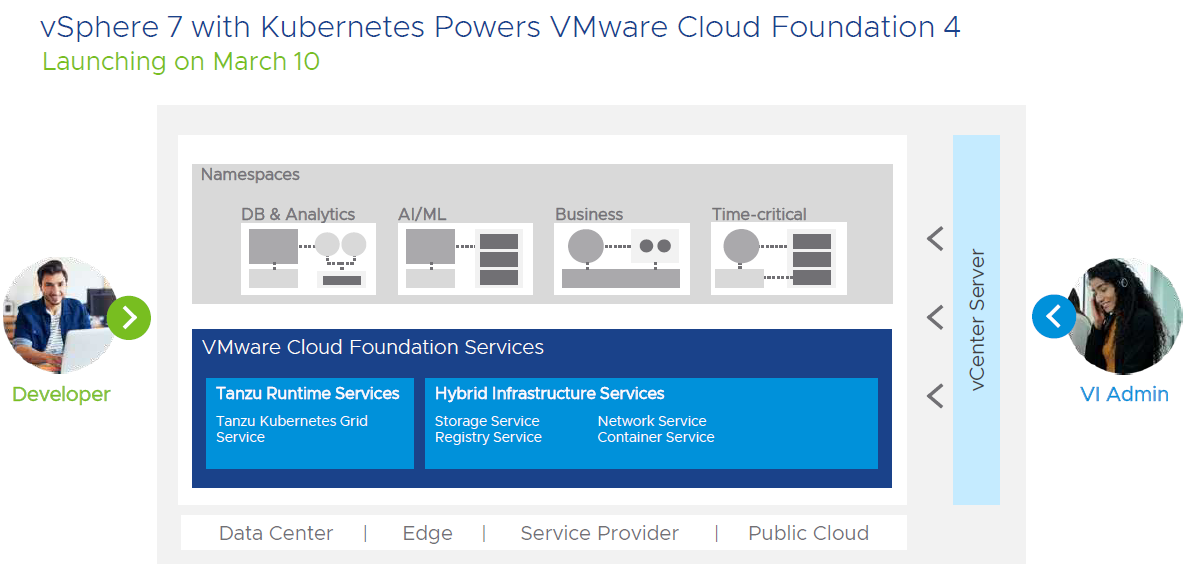 One interesting thing I found out about vSphere with Kubernetes is that it will only support Storage Policy Based Management (SPBM) for it’s storage. SPBM is based on VASA which is what both vSAN and vVols use to provision and manage storage resources. From what I heard at launch only vSAN will be supported as storage for vSphere with Kubernetes, as VCF does not yet support vVols as primary storage in workload domains (this is in the works though). While this seems to exclude using traditional VMFS & NFS storage with vSphere with Kubernetes I did hear that you can use SPBM with tags (VASA 1.0) if you want to use VMFS or NFS. However VASA 1.0 was fairly limited in what it could do so it is not ideal and if you want the best possible experience vSAN or vVols is the way to go.
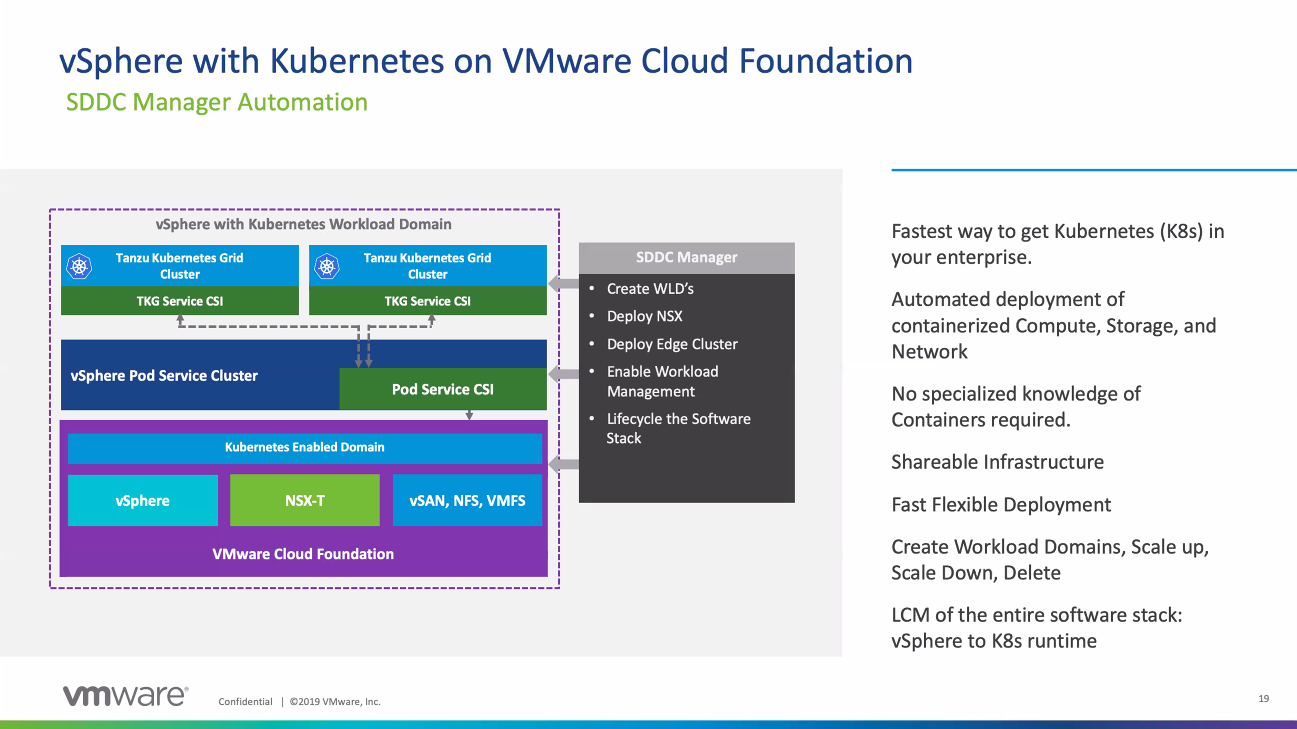 To get all this Kubernetes in vSphere goodness you will need to be running all the newest versions of VMware products which are part of the VCF 4.0 BOM, this includes vSphere 7.0, vSAN 7.0, SDDC Manager 4.0 and vRealize 8.1 apps. The full BOM is listed below:
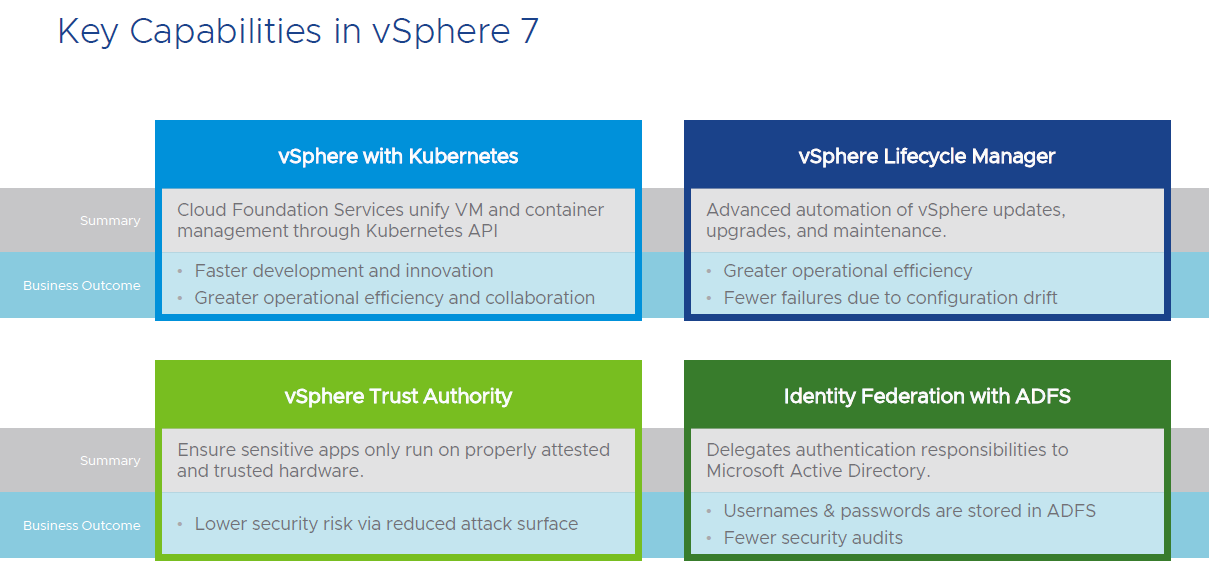
 Besides Kubernetes support there is a lot more in vSphere 7.0, I’m not going to go into that in a lot of detail here, I’ll be doing separate posts for some of that, at a high level here is what VMware is highlighting:
 As far as storage goes most of the enhancements in vSphere 7.0 are with vSAN, however there are two key capabilities that apply to external storage, support for NVMeoF and support for shared VMDK’s. The new shared VMDK feature allows VM’s to share a disk without using RDM’s. VMware built support for SCSI-3 persistent reservations into VMFS 6 so for any applications like MSCS that require sharing a disk you no longer have to use RDM’s. However the better way to do this of course is to just use vVols instead 😉
Speaking of vVols, there is no change to the VASA 3.0 spec in this release, VMware has largely been waiting for vendors to catch up. I do know that VMware is working on a VASA 3.5 spec with some small enhancements and also a VASA 4.0 spec with some big enhancements mainly focused on NVMe support. However that does not mean vVols doesn’t get any love in this release, VMware has put a lot of effort into improving vVols interoperability with their products.
The biggest one being that SRM (8.3) now supports vVols replication through SPBM (yeah!). I’ve been working very closely with Velina who is the SRM product manager on this new support as HPE is still one of the only vendors that even supports vVols replication. With this new support hopefully more vendors support it as well, I know at least one who is just about to support it and another that will be coming soon as well. I’ll be doing a separate post on the SRM vVols support.
In addition vVols is also supported with vROPs 8.1, prior to this vROPs hid any vVols objects so you could not see them in any dashboards. Now they will be visible inside vROPs. Finally VMware added CNS support for vVols into vSphere as well, this allows you to use vVols as persistent storage in CNS using SPBM policies to map to a Storage Class.
There is a lot more in vSphere 7.0 which I won’t cover here that includes:
- vCenter profiles that allow consistent vCenter configurations
- vCenter greater scalability to support more VM’s and hosts
- vCenter Update Planner to make upgrading easier
- vSphere Lifecycle Manager that includes host firmware management
- Improved DRS that is workload focused with scalable shares
- Assignable hardware direct to VMs
- vMotion improvements including reduced stun time and memory copy optimizations
- VM hardware v17 with a new watchdog timer feature that can monitor the OS
- Precision Time Protocol (PTP) support for sub-millsecond accuracy
- Simplified certificate management and a certificate API
- vSphere Trust Authority and Identity Federation
So there are a lot of great things in this release and a lot of changes as well which begs the question, how fast will users migrate to vSphere 7.0? Historically I’ve found that many customers sit on their current vSphere versions for quite a while. I still know customers that are running vSphere 5.5 and a big part of VMware’s user base stayed on 5.5 until it was near end of support.
Today most of VMware’s install base is spread evenly across vSphere 6.5 & 6.7 from what I’ve seen. I suspect only customers that are interested in the new Kubernetes support will migrate to vSphere 7.0 early on but many customers also avoid the initial release of a major version and prefer to wait until at least one update release is available.
I think the migration to vSphere 7.0 will be very slow, the small and fearless early adopter crowd will probably quickly cross over but I’m betting the rest of the VMware install base will proceed slowly with caution. In addition I think the native Kubernetes integration may intimidate the traditional vSphere admin who is not used to dealing with containers and wants to avoid the complication that this introduces into their core products. It will take some time for vSphere admins to warm up to supporting containers, it will happen eventually but from what I’ve seen in the past they tend to be resistant to major change in their environments.
Whether you plan on upgrading to vSphere 7.0 right away or not I still encourage you to study up on it and learn about all the new capabilities and enhancements that it provides. At some point you will have to migrate to vSphere 7.0 so getting some early experience with it will be helpful down the road when you decide to make the leap. Be sure and check out my vSphere 7.0 Link-O-Rama which will be continually update with links to information on everything you need to know about vSphere 7.0.
Mar 04 2020
Top vBlog 2020 starting soon, make sure your site is included
 All right let’s do this, Top vBlog 2020 is about ready to go. The last Top vBlog 2018 kicked off at the end of 2018 and wrapped up in March 2019 and was based on blogging done in 2017. As we were running behind the timing worked out that I didn’t do one last year and to get back on track we are fast forwarding so Top vBlog 2020 will be based on blogging that occurred in 2019 and not 2018.
I’ll be kicking off Top vBlog 2020 very soon and my vLaunchPad website is the source for the blogs included in the Top vBlog voting each year so please take a moment and make sure your blog is listed. Every year I get emails from bloggers after the voting starts wanting to be added but once it starts its too late as it messes up the ballot. I’ve recently cleaned up the vLaunchPad (it’s a little messy right now with blank spots that will be cleaned up) and archived over 130+ blogs that have not blogged in over a year in a special section, those archived blogs still have good content so I haven’t removed them but since they are not active they will not be on the Top vBlog ballot. I also deleted about 50+ blogs that were not existing anymore.
So if you’re not listed on the vLaunchpad, here’s your last chance to get listed. Please use this form and give me your name, blog name, blog URL, twitter handle & RSS URL. The site should be updated in the next 2 weeks to reflect any additions or changes. I’ll post again once that is complete so you can verify that your site is listed. So hurry on up so the voting can begin, the nominations for voting categories will be opening up very soon.
Special thanks to Zerto for sponsoring Top vBlog 2020!
Feb 28 2020
Will there be a VMworld event this year?
With the continued spread of the coronavirus more and more large event conferences are being canceled. Facebook has already canceled their F8 conference in May which was going to be held in San Francisco and attracts around 5,000 attendees. Mobile World Congress a large telecom event which was being held in Barcelona was also recently canceled. Other conferences like the Game Developers Conference (GDC) which attracts over 28,000 attendees and is scheduled to be held in March in San Francisco is still on for the moment but key vendors have already pulled out and they are closely watching for new developments that may cause them to cancel the event.
The situation with coronavirus is expected to get worse before it gets better and the CDC warns that it’s not a matter of if the coronavirus will spread in the US but more a question of when it will happen. In addition San Francisco has recently declared a state of emergency to help prepare for the spread of the virus within the community. With that in mind I expect we will see more and more tech conferences get cancelled this year. VMworld is still 6 months out and it might be too early to tell what the situation will be like then but if I had to speculate I’m betting there is a good chance that there won’t be a VMworld this year.
If the conference does get canceled I expect the event will go on instead as a virtual event instead of a physical in-person event which is what Facebook is doing with their F8 conference. There is already a framework in place to do this with the virtual VMUG events that are held periodically throughout the year. Virtual VMUGs do have keynotes, breakout sessions, vendor booths, chat and more but it definitely won’t be the same as an in-person event as you just can’t have the same quality of interaction with others that you get at a physical event.
I’m sure VMware is monitoring the situation closely and will plan accordingly based on how events unfold in the US. VMware’s big announcement for this year will occur next month at an online event but I’m sure they are excited to be able to use VMworld to show off everything they have announced. Other big tech conferences such as Dell World is coming up in May and HPE Discover in June and it will be interesting to see what happens with those events.
Until then we’ll have to wait and see, I’m still planning to attend, this will be my 13th time attending VMworld and I’ll be dis-appointed if the event does not happen this year. I’m hopeful that the emergency response within the US stops coronavirus from spreading through mass population centers but nothing is more important then your health and if the event cannot go on I’ll more than understand.
Feb 14 2020
Sign up now for VMware’s big launch announcement on 3/10
 VMware has announced an upcoming event where they will reveal “new product details across VMware’s complete modern applications portfolio”. You can probably guess what this is about, the long awaited next major version of vSphere featuring the native Kubernetes support that they announced as Project Pacific back at VMworld. This has been the longest time between VMware major releases, almost 2 years since vSphere 6.7 was released in April 2018, so a release is way overdue. Part of the reason for the delay I believe is the extensive engineering VMware had to do to embed Kubernetes support directly into vSphere. So go sign-up for the event, in usual fashion the event is just the announcement for the new products and the release is usually a few weeks afterwards.
Feb 11 2020
Heads up: If you are using vVols be careful upgrading to 6.7 U3
For all those that are using vVols and looking to upgrade to vSphere 6.7 Update 3 take note of an important change that VMware quietly made in that release which could potentially cause issues with vVols by not allowing self-signed certificates to be used by default. As you know a certificate is required for communication between vCenter, ESXi hosts and the VASA Provider of a storage array, this certificate is setup when you register a VASA Provider in vCenter Server. There are 2 different kinds of certificates that you can use for this, a server/self-signed certificate and a Certificate Authority (CA) signed certificate, let’s talk about the differences between the two.
A self-signed certificate is the cheap and easy route so many people go this route but it’s also less secure. Anyone can create a self-signed certificate which is basically equivalent to creating your own ID card that isn’t verified by the government. You can use self signed certificates both internally on your network and externally on the public internet. You’ll know if you are accessing a website that uses self-signed certificates as most browsers will display a warning and not load a https:// page by default and you have to choose an option to proceed at your own risk.
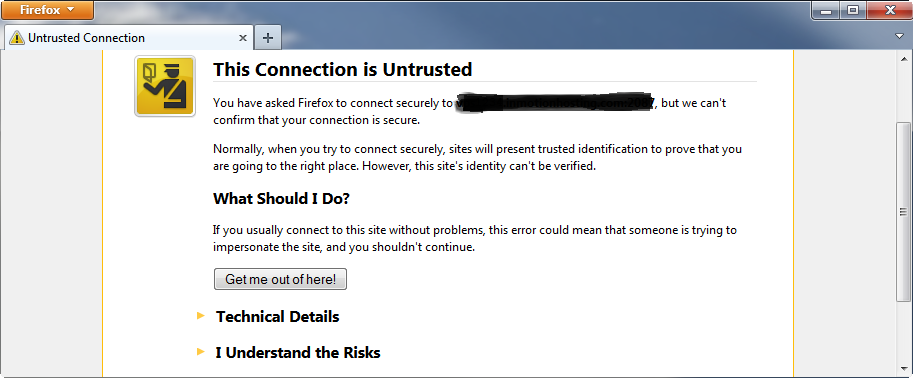 As it relates to the VASA Provider many users will create a self-signed certificate on a storage array that is then used to register with vCenter Server to secure communication to the VASA Provider. This is quick and easy to do and for internal use within a data center it is often done this way as many people foresee minimal risk within their internal networks. For example on 3PAR you simply use the ‘createcert vasa -selfsigned’ command to create the certificate and then when you register the VASA Provider in vCenter and it connects to the array using the URL provided you will get a security alert that you can verify the certificate fingerprint and you will have to say Yes to be able to proceed acknowledging you want to connect anyway.
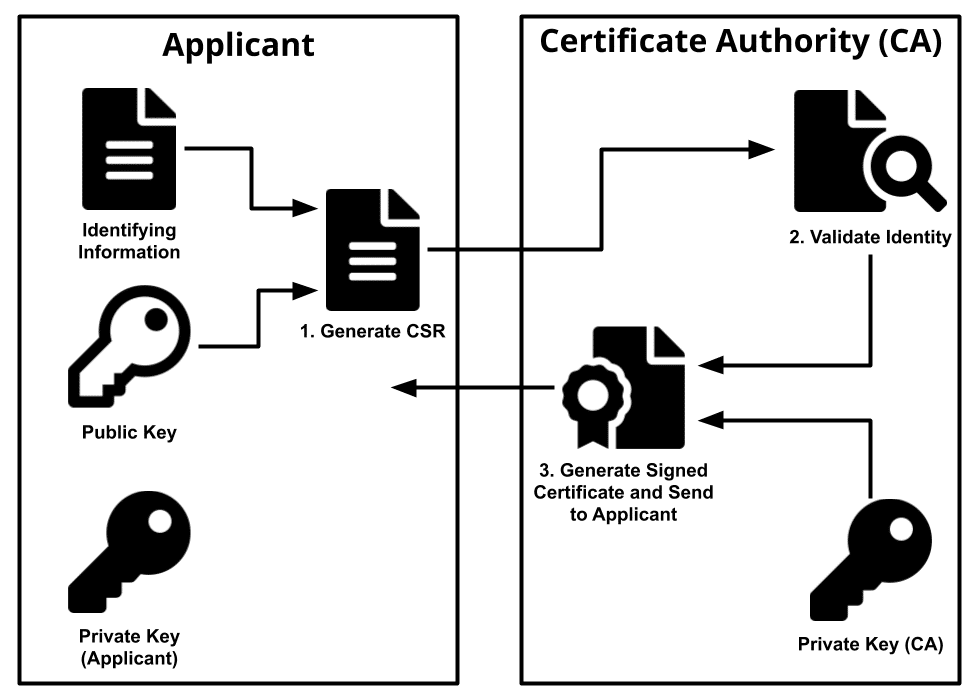
A Certificate Authority (CA) signed certificate is more complicated as it requires setting up a trusted entity that can act as a authority to verify that a certificate is legitimate, this is equivalent of having a government verified ID card. A CA can be either privately deployed and managed in your data center or using one of the public CA’s like VeriSign or GoDaddy. In a private data center you would typically deploy your own CA such as the one built into Windows Server/Active Directory that would serve as the trusted root CA for your entire data center.
As it relates to the VASA Provider, VMware provides a CA service with their VMware Certificate Authority (VMCA) which is part of their Platform Services Controller (PSC). The VMCA acts as a CA for certificate management across the entire vSphere environment which includes vCenter Server, ESXi hosts and also the VASA Provider. So instead of using a certificate created and signed by the array you have to instead create a Certificate Signing Request (CSR) which is then used by the CA to generate a certificate which can be used by the storage array. Think of this as filling out an application for an ID card that is submitted to a government agency which approves it and issues you an ID card to use.
 Setting up PSC and VMCA has historically been a complicated process since it was introduced in vSphere 6.0, VMware has tried to make it easier in subsequent releases but it can still be a headache. I know I personally have always dreaded certificate management and I think many admins are also intimidated by certificate management. That’s why for those instances when you need to use a certificate, creating a self-signed one is much simpler to do especially if you do not have a CA in your environment already.
So onto the issue as it relates to vVols and vSphere 6.7 U3, VMware has been continually trying to make vSphere more secure and the change they made in 6.7 U3 is to not allow self-signed certificates by default. We were told by VMware to expect this change in an upcoming 6.7 release and also in vSphere.Next and have been pushing back on them to give us time to allow us to test, document and communicate this to customers. The change made it into the upcoming vSphere.Next build but we were able to get them to back it out and wait for U1 but it looks like they went ahead and already implemented it in 6.7 U3.
So if you are using any self-signed certificates they will no longer work if you upgrade to 6.7 U3. So this means the communication with the VASA Provider will also no longer work which will impact certain operations such as powering on VMs. We think the majority of our customers using vVols are using self-signed certificates so this could have a big impact, I have already been involved with one customer that upgraded and experienced this issue. The quick workaround is to add a host advanced setting on every host to allow self-signed certificates, once you add this setting they will work again. See the below note in the vSphere 6.7 U3 release notes:
- You might be unable to add a self-signed certificate to the ESXi trust store and fail to add an ESXi host to the vCenter Server system The ESXi trust store contains a list of Certificate Authority (CA) certificates that are used to build the chain of trust when an ESXi host is the client in a TLS channel communication. The certificates in the trust store must be with a CA bit set:
X509v3 Basic Constraints: CA: TRUE. If a certificate without this bit set is passed to the trust store, for example, a self-signed certificate, the certificate is rejected. As a result, you might fail to add an ESXi host to the vCenter Server system.This issue is resolved in this release. The fix adds the advanced optionConfig.HostAgent.ssl.keyStore.allowSelfSigned. If you already face the issue, set this option toTRUEto add a self-signed server certificate to the ESXi trust store.
While this works for now, longer term you will need to switch to using VMCA as your certificate authority and not use self-signed certificates for your VASA Provider. We are working with VMware to see if they can back this out of 6.7 for now but that most likely will not happen. Hopefully VMware will communicate and document this better instead of just a footnote in their release notes as it can have a big impact on customer environments not just with vVols but anything that uses a self-signed certificate. We are also looking to publish some guidance to help make it easier for customers to migrate from self-signed certificates to VMCA certificates for their VASA Provider. So be careful if you plan on upgrading to 6.7 U3 and definitely plan on using VMCA at some point. As I get more information on this change I’ll pass it along.
Jan 23 2020
Coming Soon: Top vBlog 2020
After a brief hiatus and a health scare, I’m back at it and ready to launch the next Top vBlog voting. We have been running behind the last few years so I’ve decided to fast forward to 2020 which will be based on on blogging activities in 2019 so we’re all caught up to the present time.
The modified scoring method I’ve been using the last few years will remain the same. Instead of just relying on public voting which can become more about popularity and less about blog content, I added several other scoring factors into the mix which has worked out well. The total points that blogger can receive through the entire process will be made up of the following factors:
- 80% – public voting – general voting – anyone can vote – votes are tallied and weighted for points based on voting rankings as done in past years
- 10% – number of posts in a year – how much effort a blogger has put into writing posts over the course of a year based on Andreas hard work adding this up each year (aggregator’s excluded)
- 10% – Google PageSpeed score – how well a blogger has done to build and optimize their site as scored by Google’s PageSpeed tools, you can read more on this here where I scored some of the top blogs.
Once again the 10 minimum blog posts rule in 2019 will be enforced to be eligible to be on the Top vBlog voting form. Stay tuned for more details and the kickoff which will happen in the next few weeks.
And a big thank you to Zerto who stepped up to sponsor Top vBlog 2020!